Test Your Website on Mobile
Check representative pages and the actual contact, booking or purchase journey. Use PageSpeed and Lighthouse for performance, browser emulation for layout and a real phone for interaction. Keep lab scores, real user data and successful task completion separate. Record the tested URL, state, device and settings, then repeat the same checks after
To check whether your website works on mobile, combine a performance report with a hands-on test of the visitor’s task. A fast page can still have an unreachable submit button. A responsive layout can still lose a
Google retired its Mobile-Friendly Test and API in December 2023. PageSpeed Insights, Lighthouse, browser emulation and a real phone cover different parts of the job. None alone certifies a website as usable, accessible or ready
Start with the pages and actions that matter
Choose your homepage, a main product or service page, and an article. Include the actual contact, booking or checkout journey, even if it uses another domain. Test relevant languages and states: a first visit with a consent banner, a returning visit, an open menu, and a form with
Our free mobile-friendly checker is an optional first check. It examines the fetched HTML and related response information for clues such as a missing viewport tag, fixed inline widths and very small inline text. It does not render the page, execute its JavaScript or calculate the layout from external stylesheets. Its HTML size is not the total download size, and its fetch time is not a real phone’s loading time. Confirm flagged issues in
| Check | Useful for | What it cannot establish |
|---|---|---|
| PageSpeed Insights | Real user performance where available, plus a Lighthouse lab test | Whether every menu, form and payment step works |
| Lighthouse in Chrome | Repeatable diagnostics, including pages accessible in your local browser | Performance for your whole visitor population |
| DevTools device mode | Layout, wrapping and overlays at chosen screen widths | Exact behaviour on a physical phone |
| Search Console | Core Web Vitals problems across URL groups | A complete inventory of usability or accessibility defects |
| A real phone | Touch, keyboard, browser behaviour and completing a task | Coverage of every device and visitor |
Read PageSpeed’s two kinds of result
Open PageSpeed Insights, enter the public URL and
The field section uses Chrome UX Report data from the previous 28 days. Check whether the heading refers to This URL or Origin. When there is too little URL-level data, PageSpeed can fall back to the origin, covering pages that share the protocol, hostname and port. An origin pass is not proof that the specific page passed. If neither has enough data, a missing assessment is not
The lab section is a fresh Lighthouse test under simulated conditions. Use it to investigate a slow resource or blocking script. Its performance score is separate from the field assessment. A single navigation test does not measure your visitors’ INP. Google explains these distinctions.
View the saved August 4, 2026 mobile report at full size (Origin selected; Core Web
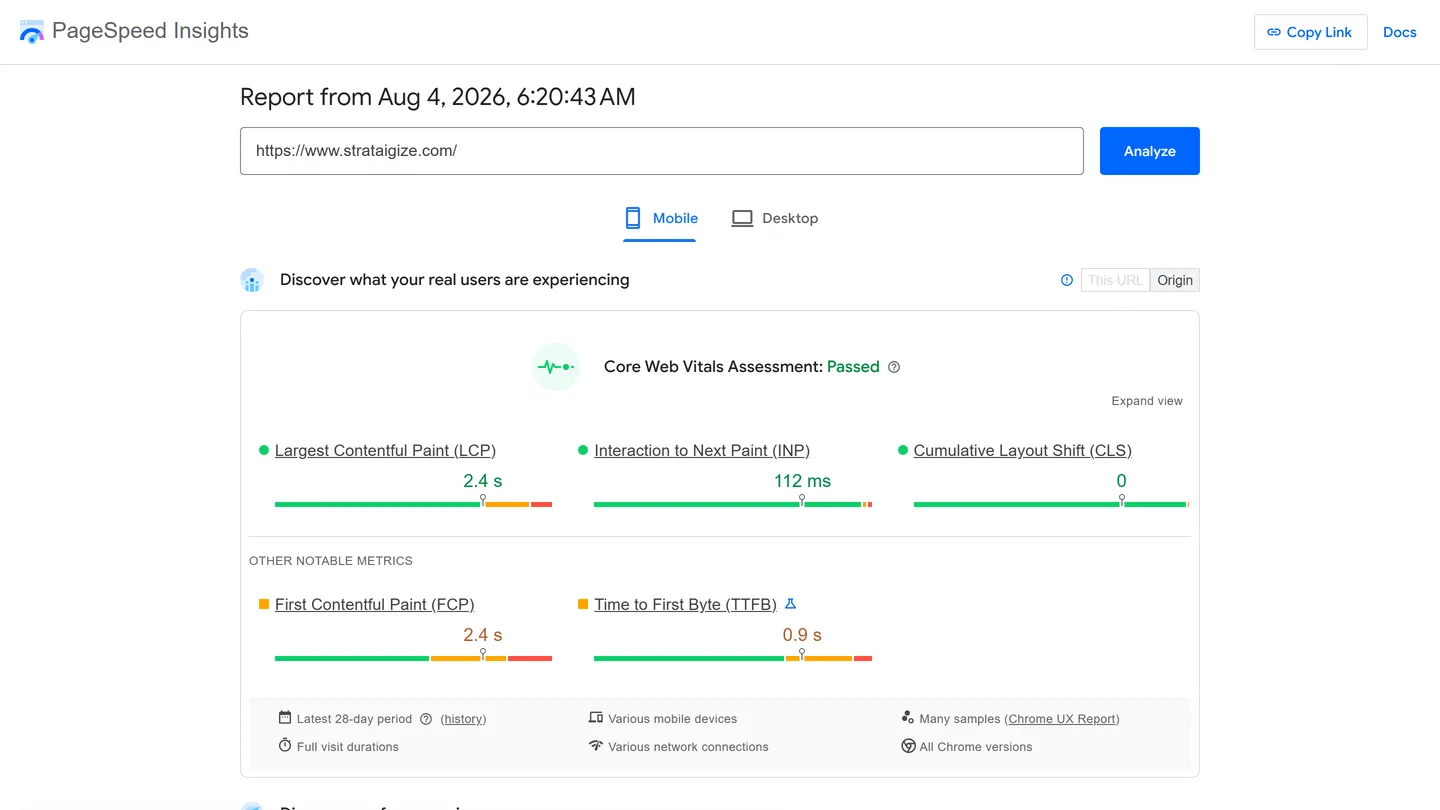
This saved example shows origin-level field results: LCP 2.4 seconds, INP 112 milliseconds and CLS 0. It contains no Lighthouse performance score. It illustrates how to read the scope of a report; it is not a current measurement of
What the Core Web Vitals thresholds mean
These classifications use the 75th percentile of the relevant field measurements, not
| Metric | Good | Needs improvement | Poor |
|---|---|---|---|
| LCP: main content appears | ≤ 2.5 s | > 2.5 to 4 s | > 4 s |
| INP: response to interaction | ≤ 200 ms | > 200 to 500 ms | > 500 ms |
| CLS: unexpected layout movement | ≤ 0.1 | > 0.1 to 0.25 | > 0.25 |
For a full three-metric pass, all three must be good. PageSpeed can still pass an assessment when INP data is insufficient if LCP and CLS are both good; insufficient LCP or CLS data prevents an assessment. This is the documented PageSpeed assessment rule, not a substitute for
Compare Search Console at the same scope
In Search Console, open Core Web Vitals and the mobile report. Inspect the affected URL group, its worst metric and the example URLs. Google groups pages with similar experiences; a group is not necessarily identical to your site’s template list. Reproduce the issue before assuming that one shared component
PageSpeed and Search Console can disagree even when you compare field data with field data. Check URL versus origin versus group, device, collection period and URL handling. Search Console includes URL parameters when distinguishing pages, whereas PageSpeed field data aggregates without them. Do not explain every difference as “one is lab, one is real users.” Search Console’s report documentation describes
After deploying a fix, confirm it immediately with the same browser steps and lab settings. Field results change as the rolling window fills with newer visits. Start Tracking starts a 28-day validation period; it does not force a crawl or reindex the site. A change may affect the displayed data before 28 days, while validation still needs its monitoring period and
Use Lighthouse with recorded settings
Open the page in Chrome, open DevTools, choose Lighthouse and select Mobile before running the audit. Local Lighthouse can test authenticated pages that a public PageSpeed request cannot access. The Lighthouse documentation explains the
Save the report, date, tested URL, Lighthouse version, device and throttling settings, and the page version you tested. Keep those conditions consistent when comparing a change; repeat a surprising result. A different machine, browser version, consent state or test configuration can change the result. Manually slowing a CPU in DevTools does not guarantee a match with
Automate a lab test with the PageSpeed API
This Bash command requests performance, accessibility and SEO diagnostics for a public page. Replace the
curl --get \
  'https://www.googleapis.com/pagespeedonline/v5/runPagespeed' \
  --data-urlencode 'url=https://example.com/' \
  --data-urlencode 'strategy=mobile' \
  --data-urlencode 'category=performance' \
  --data-urlencode 'category=accessibility' \
  --data-urlencode 'category=seo'
On Windows, use a Bash terminal for this multiline syntax. Google’s getting-started guide documents API access and recommends a key for frequent automated queries. Check your project’s quota before scheduling batches. An HTTP error, including a quota response, is not a failed
Within lighthouseResult, read categories and audits; a category score of 0.92 means 92 out of 100. Save fetchTime, lighthouseVersion, requestedUrl, finalUrl and configSettings, and handle runtimeError before accepting the result. See the response reference. For ongoing field monitoring, Google’s guide recommends the CrUX API or CrUX History API because it plans to discontinue CrUX data in the
Test the task in a browser and on a phone
In DevTools, enable the device toolbar and start at 360 × 800 and 390 × 844 CSS pixels. Resize between widths, then test horizontal orientation. Device mode approximates a phone; finish on physical devices and browsers relevant to your visitors, including Safari on iPhone
Check the following on the
- Open and close navigation, consent controls and dialogs. Check that fixed headers and banners do not cover text or controls.
- Read long headings, tables and translated text. Test zoom and a narrow layout. The Web Content Accessibility Guidelines (WCAG) reflow criterion uses 320 CSS pixels for vertically scrolling content, equivalent to a 1280-pixel viewport at 400% zoom. Genuine two-dimensional tables have an exception; preserve readable content and usable scrolling instead of hiding overflow.
- Tap adjacent controls and use a keyboard where supported. WCAG 2.2 AA’s target-size criterion uses 24 × 24 CSS pixels with spacing and other exceptions. Larger controls, such as 48 × 48, can be a comfortable design choice. Neither number alone proves accessibility compliance.
- Fill the form with the on-screen keyboard open. Check labels, focus, errors, preserved input, submission and the confirmation state. For purchases or bookings, use an approved test environment and verify the corresponding receipt or record.
- Repeat on a relevant mobile connection. Confirm that delayed loading or a failed request leaves a clear recovery path.
A useful issue report is specific. Hypothetical example: “On the booking page at 390 × 844, opening the keyboard and consent banner covers Submit. The page scrolls, but the button remains unreachable.” Attach the URL, browser/device, state, reproduction steps, screenshot, expected result and owner. A blocked booking deserves attention even when the performance score
Fix the cause you measured
For a slow LCP, identify the actual largest element and its loading delay. If it is an image, make it discoverable early and avoid lazy loading it. Preload only when the resource needs earlier discovery; do not preload every image or font. Google’s LCP guide explains
For sluggish interactions, record the interaction and investigate blocking work. Reduce unnecessary script work or split long tasks while preserving required functions and consent. For layout shifts, reserve space for images, embeds and inserted content. The INP and CLS guides provide diagnostics for those
On WordPress or Shopify, test a theme or app change in staging with the same content and journey. Measure its effect before blaming every plugin or proposing a rebuild. Some fixes are configuration changes; others require a component change. Our website optimization service can help identify and implement that work, with website development where code changes
Keep indexing and usability separate
Google’s mobile-first guidance recommends responsive design but also supports other mobile configurations. Ensure the mobile content, images and metadata are accessible to Googlebot. A usable page can still have an indexing problem, which requires a separate SEO investigation.
Core Web Vitals contribute to Google’s ranking systems, but good scores do not guarantee high rankings, and a poor score alone does not establish a penalty. Google’s page experience guidance puts them alongside the broader usefulness of
Keep the final record practical: the issue found, the change shipped, the task successfully retested, and any field validation still pending. Recheck the affected journeys after theme, app, form or tag changes. Passing an automated assessment is useful evidence; a visitor completing the intended task is a