Home / Services / AI systems / Always-on
Service and operations
An operator that works while the team sleeps, and can show its work in the morning.
Keep scheduled reporting, checks and coordination running beyond office hours. The agent works within assigned systems and records its actions. Our own operations agent sends spending decisions and client messages to a person
Who it is for
Teams that need this workflow.
Founders whose evenings are the
Operations teams with a dozen recurring jobs that live in one
Companies that want an agent on a server that is up when every laptop
What it does
Always-on operations agents, by the job.
Runs the daily jobs
Reports pulled, digests written, records reconciled, files moved, reminders sent: the scheduled work a person does at seven in the morning or does not do
Answers the team where they work
Questions in Slack about what happened, what is due and where something lives, answered from the systems it has read access to, with
Monitors its responsibilities
Pipelines that did not run, feeds that went stale, a number that moved too far: raised to a person before it reaches
Records everything it does
One standard: the agent knows its own activity without a gap. Every action and every message is logged, and a person can reconstruct any day from
How it is built
The build, in order.
The pilot covers one defined workflow. We agree its success metric and kill threshold in writing before the build; the steps below show how this system is developed
List the recurring work
Every job that happens daily or weekly, who does it, what it reads, what it writes, and what goes wrong when it is skipped. The agent takes the ones with a clear input and a
Grant access narrowly
Read access broadly, write access per system and per action, with credentials in a managed store that the agent cannot print. Spending and client messages run inside limits
Run on a server
A VPS, your cloud account or a container in your data centre, so the agent is up when laptops are shut. Every file it changes carries a backup and a
Review the log weekly
Review failed runs, repeated alerts and actions held for approval. Use the record to fix the workflow or its rules while retaining the agreed
In production at Strataigize
We run this ourselves.
Chuck, our AI Operations Agent, is the always-on agent that runs Strataigize's operations from a server that is up when every laptop is closed. He runs scheduled jobs, talks to the team in Slack and writes the daily digests. He also taught us the hard rules on this page: a guard that wrongly refuses is worse than the bug, an alert that fires every day is a broken alert, and a rule that lives somewhere other than the code path that executes it will eventually be skipped. Chuck himself works under our own stricter rule: anything that spends money or messages a client goes to a
Governance
Controls and human review.
- Read access broadly, write access narrowly, granted per system and revocable
- Spending and client messages run only inside limits you write; anything outside them, and any credential change, goes to a person
- Every file it changes carries a backup and a one-line revert, and its log is complete by standard
The rest of the posture is published on trust and security: client-granted access you can revoke, credentials in managed stores, an AI governance summary aligned to the NIST AI Risk Management Framework, our subprocessors, and a DPA on request. We do not hold SOC 2 and we say
Case studies
The work behind it, documented.
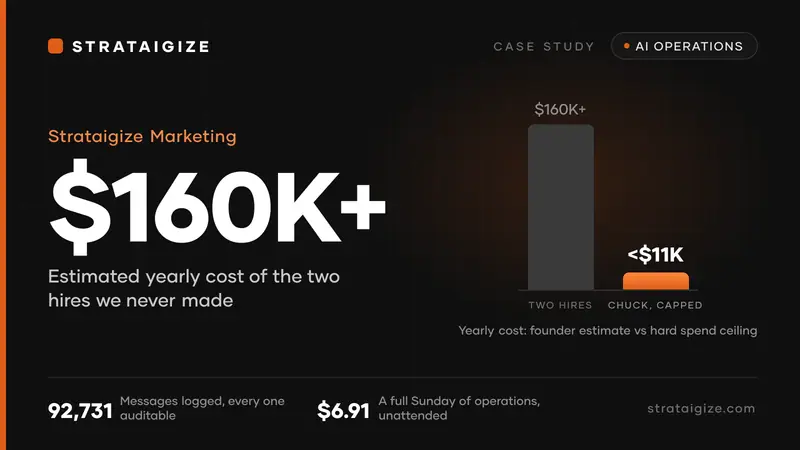 $160K+Founder-estimated annual cost of two avoided hires
Strataigize Marketing
AI Agents for Business: Our Agency's AI Operations Agent
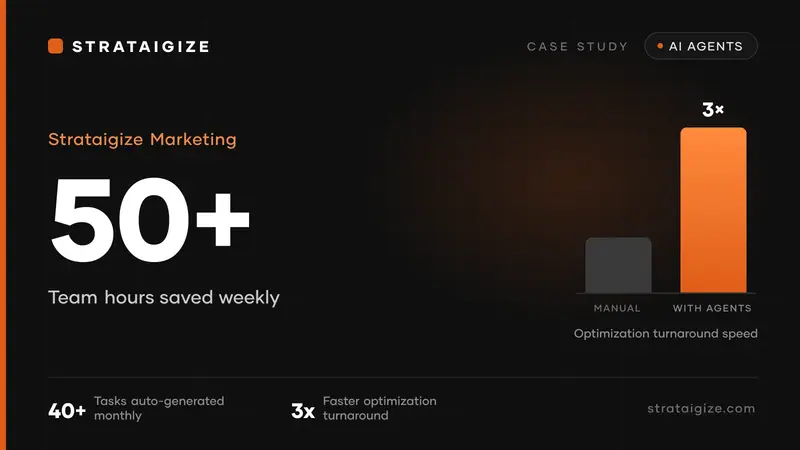 50+Estimated team hours saved weekly
Strataigize Marketing
How Our Marketing Agency Uses AI Agents to Automate Busywork
Questions
Always-on operations agents, answered.
What is an AI operations agent?
What does it run on?
How is this different from Zapier or Make?
Related
Where this connects.
AI workflow automation · AI agent development · AI
The other systems in the catalogue: lead qualification agents, outbound sales agents, customer support agents, document processing agents, internal knowledge assistants, ad optimization systems, client reporting automation, content engines, computer vision systems, MCP servers and agent-callable surfaces.
Talk to the build team about always-on operations agents
Share your website or app URL. We reply within 24 hours with a suggested starting point and what we need to scope
Teams we've

- Kleo
- Goodwill
- GameGo
- Hino Motors
- Sad Panda Studios
- StoryNest
- Blush Blush
- Stoic Forge
- Beyond Score
- MyPetHealth
- TaskHive
- Sincere Notes
- Voices in my Head
- Black Top Cabs
- BeNow Trader
- Crystalyze
- 24/7 AI Health
- Aero Imagery
- RepairFind
- Prepr
- Guiding Light
- Freestyle Dance Studio
- First Step Mobility
- Noa Coach




 Kleo
Kleo

 Goodwill
 GameGo

 Hino Motors
 Sad Panda Studios




 StoryNest
 Blush Blush
 Stoic Forge
 Beyond Score
 MyPetHealth
 TaskHive
 Sincere Notes
 Voices in my Head
 Black Top Cabs


 BeNow Trader
 Crystalyze
 24/7 AI Health
 Aero Imagery
 RepairFind
 Prepr
Prepr

 Guiding Light
 Freestyle Dance Studio
 First Step Mobility
 Noa Coach
Where this fits: see the Strataigize Growth System, the ladder every engagement
Start with one workflow.
On a free 30-minute consultation, we discuss your workflow and what a paid audit or pilot would need
Canadian and looking at funding? How the BDC LIFT program works. Public sector? How we build for government.
Rated 5.0 on Clutch